

The short answer is no, the extra money for the MK345 is not worth it for most home office setups. The MK270 and MK345 are built on the same platform, use the same wireless receiver, and claim identical battery life numbers. The differences that actually exist, the built-in palm rest on the MK345, a slightly larger right-handed mouse, and marginally softer key feedback, matter only to a specific kind of heavy typist. Everyone else is paying more for things they will not notice in a week.
I ran both combos in real use. The MK270 has been my daily keyboard for over two years across two different desk setups. I used the MK345 for four months in an earlier configuration before switching back to the smaller combo. What follows is a direct comparison on footprint, palm rest, key feel, mouse shape, battery life, and long-term durability. No spec-sheet padding. Just what the differences actually mean when you sit down and use both.
| label | left | right | winner |
| label | left | right | winner |
| label | left | right | winner |
| label | left | right | winner |
| label | left | right | winner |
| label | left | right | winner |
| label | left | right | winner |
| label | left | right | winner |
| label | left | right | winner |
| label | left | right | winner |
| label | left | right | winner |
| label | left | right | winner |
Where the MK270 Wins
Footprint is the clearest win. The MK270 keyboard sits smaller on your desk because it has no integrated palm rest extending the front edge. On a tight desk, that inch and a half matters. I run a 48-inch desk with a monitor arm, and the MK270 fits cleanly in front without crowding the work area. The MK345's palm rest adds width to the front of the board that you feel on anything smaller than a generous L-shaped surface. If your setup is compact, the smaller combo is not just cheaper, it is the right physical fit.
Price is the other obvious win, and it matters more than it looks on paper. The combos are functionally so similar that paying more for the MK345 only makes sense if the specific differences justify it for your workflow. You are not getting better wireless performance. You are not getting better build quality or a more reliable receiver. The underlying hardware is the same generation from the same manufacturer. You are paying for a palm rest and a right-handed mouse contour. If neither of those is on your must-have list, the MK270 is the straight-value call.
The Amazon review count also tells you something real. The MK270 has cleared 118,000 reviews at 4.5 stars. That sample size filters out a lot of noise. Satisfied short-term buyers do not leave reviews at that volume. Long-term users who kept the product and found it reliable are in that number. The MK345 has strong reviews too, but the data pool on the MK270 gives you a much wider base to draw conclusions from, and those conclusions are mostly positive.
Where the MK345 Wins
The integrated palm rest is a genuine advantage for heavy typists. The MK270 is a flat keyboard, and flat keyboards over a long day put downward angle pressure on your wrists. The MK345's built-in rest is low-profile, not a plush gel cushion, but it reduces that forearm-to-wrist angle enough that people who type for six or more hours a day consistently report feeling the difference by afternoon. If wrist fatigue is already something you notice, the MK345 closes part of that gap without buying a separate accessory.
The mouse that comes with the MK345 is also a step up for right-handed users with average to large hands. The MK270 ships with a compact, ambidextrous mouse. It works fine and it fits most hands adequately, but it is on the smaller end. The MK345 mouse has a light right-hand contour that fills the palm a bit more naturally during extended sessions. Not a full ergonomic mouse by any measure, but noticeably more comfortable than the MK270 mouse over a four-hour stretch.
Key feel is the subtlest advantage. Both are membrane keyboards with short travel, so neither is going to satisfy someone who cares about mechanical switches or tactile feedback. But the MK345 keys have a marginally softer actuation that reduces finger impact slightly over time. If you type hard, the MK345 keeps your fingers from bottoming out on a surface that feels quite as abrupt. The difference is not dramatic enough to switch someone from the MK270 to the MK345 on its own, but it adds up on a heavy typing day.
Battery life, wireless range, and spill resistance are identical on both combos. The real decision comes down to three things: how much space you have, how long you type each day, and whether your right hand wants a larger mouse.
118,000 buyers chose the MK270. Check today's price before you decide.
The MK270 is the most-reviewed wireless keyboard and mouse combo on Amazon for a reason. Compact, reliable, and consistently priced under $30. Today's price may be lower than you expect.
Amazon Check Today's Price on Amazon →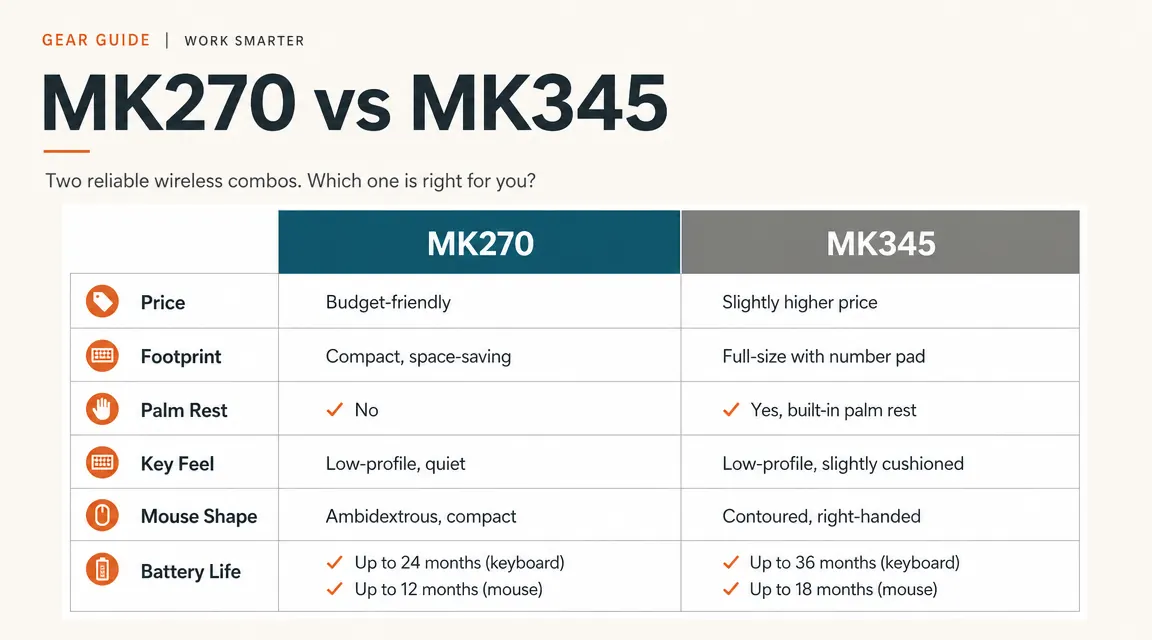
Battery Life, Wireless, and Durability
Logitech advertises the same battery life for both: up to 24 months on the keyboard, up to 12 on the mouse. In my experience with the MK270, the keyboard ran about 18 months before I swapped batteries under daily full-day use. The mouse went closer to nine months. Neither is disappointing given how much actual typing and clicking went into those numbers. Both use standard AA batteries, not proprietary or rechargeable cells. That is worth noting because it means you replace them with whatever is already in a drawer, not something you have to order online.
The 2.4 GHz Unifying receiver is identical in both combos. Logitech's Unifying system lets a single nano receiver pair with up to six compatible devices, which is convenient if you have other Logitech gear you want to consolidate onto one USB slot. The receiver stores in the keyboard base, so it does not get lost when you pack the combo for travel. Wireless performance at home office distances, meaning anywhere from one foot to ten feet, is solid on both combos with no connection drops in normal use.
Build quality on both is the expected quality for a keyboard in this price range. The plastic is not premium feeling, but it holds up. I knocked the MK270 off a desk onto hardwood twice and it did not crack or malfunction. The spill resistance on both keyboards covers minor drips and splashes, not a full water spill. Both are rated for Windows only, which rarely matters in practice but is worth knowing if you run a mixed Mac and Windows office.

Who Should Buy Which
Buy the MK270 if your desk is on the smaller side, if you do moderate typing rather than marathon sessions, or if you are setting up a second machine or a shared home office computer. It is also the right call for left-handed users and ambidextrous mouse users, since the MK270 mouse works either way. For first-time wireless combo buyers who want a reliable, well-reviewed, no-drama setup, the MK270 is the starting point that most people end up sticking with. The 118,000 reviews are not a fluke. See the current price on Amazon, then make the call.
Buy the MK345 if you type heavily all day and your wrists already give you trouble by late afternoon. The palm rest is the single biggest functional difference between the two combos, and it is real enough to justify the slight price difference for someone who types for six-plus hours daily. Also consider it if you have larger hands and found the MK270 mouse too compact for a comfortable palm grip. For everyone else, the extra few dollars is a premium for features that will not change your daily experience in any meaningful way.
The MK270 fits most desks and most budgets. See the current price before you buy.
Consistently under $30, 118,000-plus Amazon reviews at 4.5 stars. If you are ready to clear the keyboard cable off your desk, this is where most people start and most people stay.
Amazon Check Today's Price on Amazon →